

Paid Advertising9 min read
How to Improve Your Amazon IPI Score (From a Real Account Audit)
A real UK seller account scored 669 on Amazon’s Inventory Performance Index, yet three of its four factors carried warnings. Here is what the score measures, what it misses, and the five steps we use to fix it.

- Written by
- Melissa Cross
- Published
- Updated
Most sellers only open the Inventory performance page in Seller Central once something has gone wrong. Usually it is a capacity limit, or a best seller that sold out while a slow line sat in a fulfilment centre for a year.
We manage Amazon advertising for UK brands, and we look at this page every week, because ads aimed at stock you do not have are wasted money. Below is one real account as it stood in week 44 of 2026, and the five steps we use to sort out a score like it.
Quick answer: To improve your Amazon IPI score, fix the four factors Amazon builds it from. Clear excess and aged stock, raise sell-through with better pricing and traffic, fix stranded listings, and keep your best sellers in stock. Start with stranded stock (the quickest win) and your oldest units (the most expensive), and expect the score to move over weeks rather than days.
What is the Amazon Inventory Performance Index?
The Inventory Performance Index (IPI) is a score from 0 to 1,000 that tells you how well Amazon thinks you manage your FBA stock. Amazon keeps the formula to itself. The score refreshes roughly weekly, according to Amazonway’s FBA inventory guide (July 2026), and Search Engine Journal (May 2025) describes it as a 12-week rolling average. That is why it moves so slowly.
Four factors feed it:
| Factor | What Amazon measures | Dashboard button |
|---|---|---|
| Excess inventory | Stock with more than about 90 days of supply against forecast demand | Reduce excess inventory |
| Sell-through | Units shipped in the last 90 days against average units held | Improve sell-through |
| Stranded inventory | Units in a fulfilment centre that customers cannot buy | Fix listings |
| In-stock inventory | How often your selling lines were available over the last 30 days | Restock today |
Why care? Storage. In Europe, Amazon sets capacity limits by storage type and volume, and for established professional sellers that limit depends partly on IPI, according to Amalytix (October 2026). So a weak score can stop you sending stock in right before your busy season.
As for a safe score, Amazon has historically restricted accounts below about 400. Amazonway points out that the line has moved over the years and differs by marketplace, and we could not find a current UK figure published by Amazon. Trust the banner on your own dashboard over any number in a blog post. This one included.
Where do you find your IPI score in Seller Central?
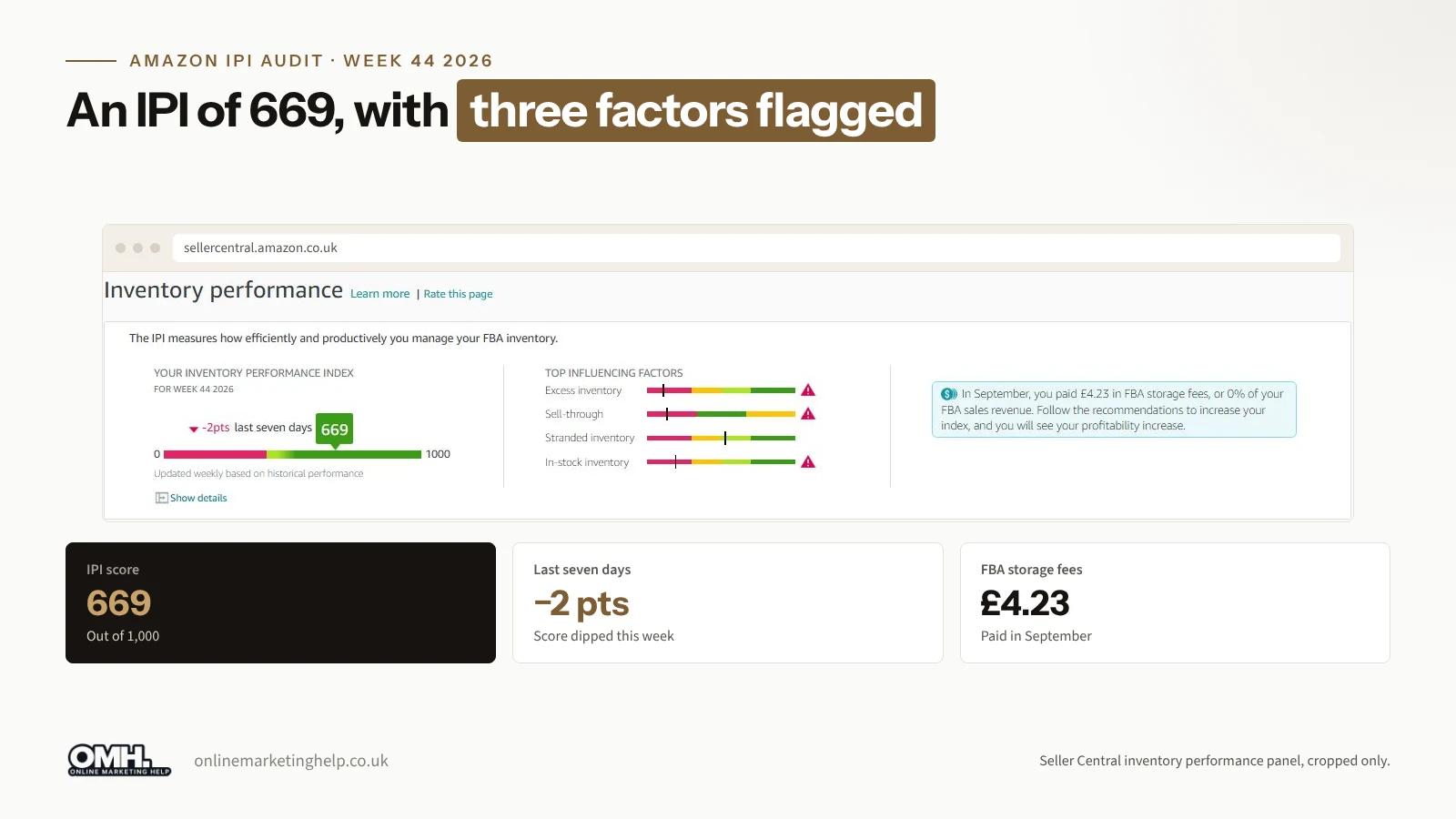
In Seller Central UK, go to the FBA menu, then Inventory, then Inventory Performance. You will see three things on the page:
- The score, with the weekly movement and a colour bar
- Top influencing factors, a small bar for each factor with a warning triangle wherever Amazon thinks you are off target
- Ways to improve your performance, which shows the real figure for each factor and a button to act on it
What does a real IPI audit look like?
This account scored 669 in week 44 of 2026, two points down on the week before. That is in the green band. At a glance, nothing to worry about.
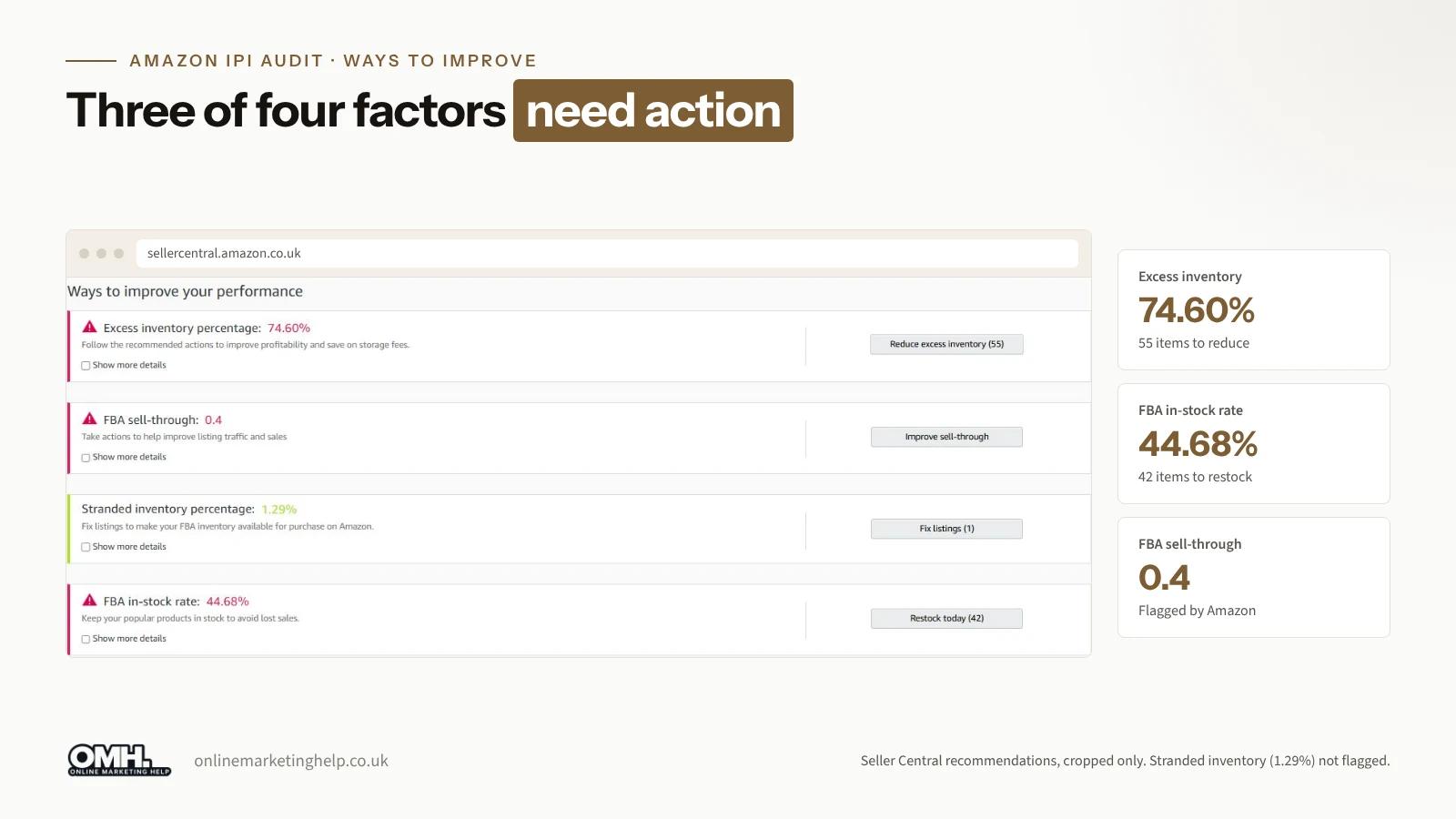
Look underneath, though, and three of the four factors carried a warning triangle. Only stranded inventory was close to where it should be.
| Factor (week 44, 2026) | Figure | Status |
|---|---|---|
| Excess inventory | 74.60% | Warning, 55 items listed |
| FBA sell-through | 0.4 | Warning |
| Stranded inventory | 1.29% | 1 listing to fix |
| FBA in-stock rate | 44.68% | Warning, 42 to restock |
Read together, the figures describe an account with too much of some products and nowhere near enough of others. Reduce excess inventory listed 55 items. Restock today listed 42.
In our experience this is the most common IPI problem of all. Money sits in slow lines while the popular ones sell out, and both the score and sales suffer for it. Telling the client to “buy less” or “buy more” would miss the point. You move the money from what is not selling to what is.
A quick note on that 0.4. It means that over 90 days, the account shipped roughly four units for every ten it held on average. Hold 1,000 units and you would have shipped about 400.
What the IPI tells you, and what it does not
What it is good at
- Showing you stock and demand drifting apart before it turns up as a fee
- Flagging stranded units as soon as a listing breaks, which is the cheapest problem on the page to fix if you catch it early
What it will not tell you
- How it is worked out. The formula is private, so nobody can tell you exactly what a fix is worth in points.
- Whether you are healthy underneath. This account was green with three warnings.
- Whether you are making money. Margin, ad spend and returns are not in it.
- Whether sales will grow. A better IPI takes stock problems off the list of things holding you back. Demand, price, reviews and advertising still decide sales, and a dashboard score cannot do their job for them.
How to improve your Amazon IPI score, step by step
Step 1: find out what is ageing
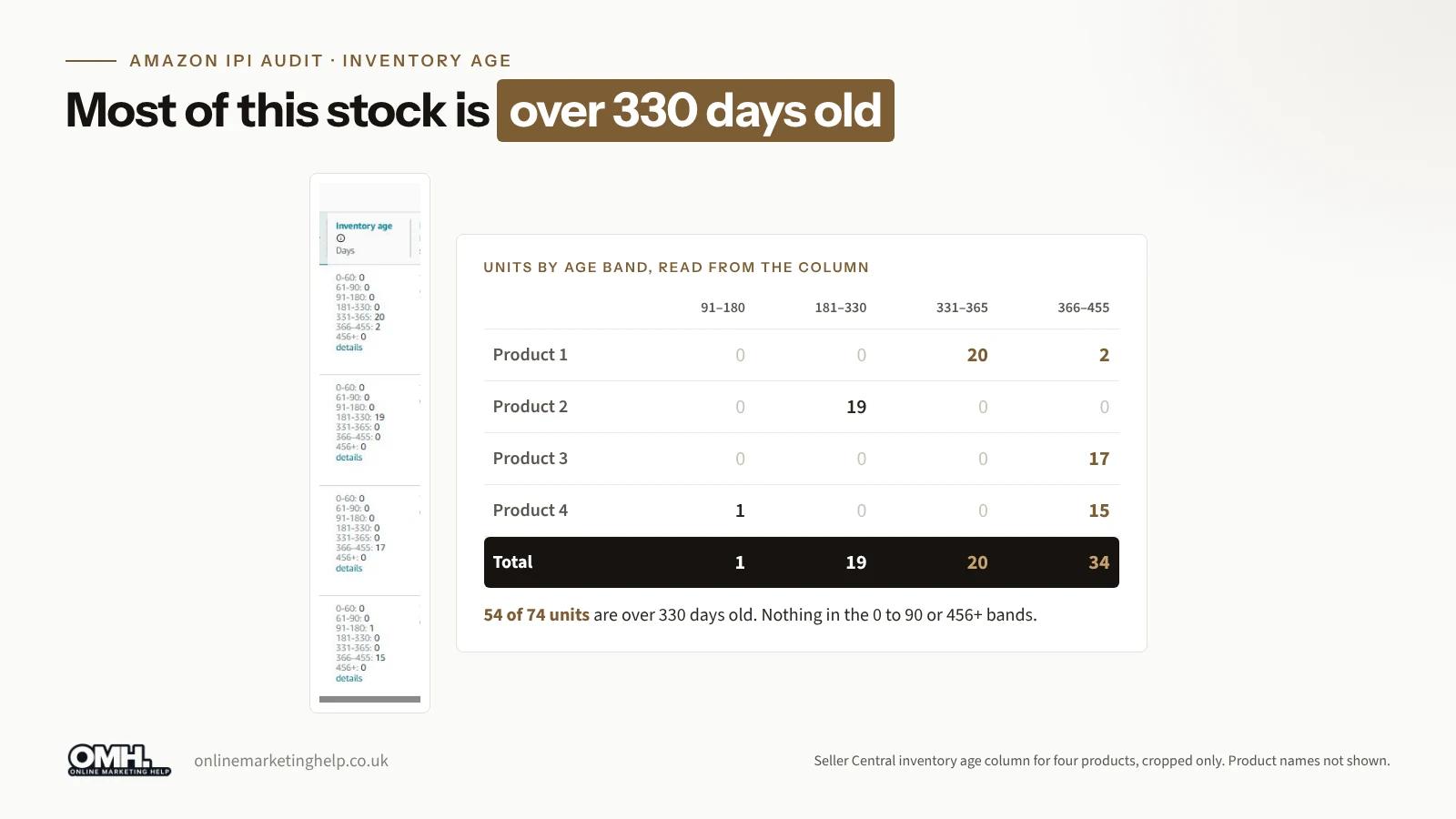
Check how old the stock is before you press anything. The Inventory age column splits units into bands, from 0 to 60 days up to 456 days and over. Four products on this account showed the pattern clearly:
| Product | Where the units sat |
|---|---|
| Product A | 20 units at 331 to 365 days, 2 at 366 to 455 days |
| Product B | 19 units at 181 to 330 days |
| Product C | 17 units at 366 to 455 days |
| Product D | 1 unit at 91 to 180 days, 15 at 366 to 455 days |
Not one of those units was under 91 days old, and most had been there close to a year or longer. That is the stock behind the excess figure, and the stock most likely to pick up aged inventory charges. On Amazon’s EU rate card in force from 1 July 2026, the surcharge starts at the 241 to 270 day band, according to Amazonway. We could not find UK thresholds published in the same detail, so open the fee schedule in your own UK account before you decide what to clear first.
Step 2: reduce excess inventory
Open Reduce excess inventory and start with the oldest bands:
- Check the price against similar products. If it is too high, the stock will not clear, however long you leave it.
- Put a time-limited coupon or price cut on the oldest units.
- Back it with Sponsored Products ads. Excess stock nobody sees stays excess.
- Raise a removal order for anything that will not sell, so you stop paying to store it.
- Stop reordering until weeks of cover come back down.
Step 3: fix stranded inventory
Stranded inventory is stock sitting in a fulfilment centre that customers cannot buy, usually because a listing has an error or has been closed. Here it was 1.29%, one listing. Click Fix listings, read the reason Amazon gives, and put it right. You have paid for every stranded unit and it is earning nothing, so we clear these before anything else.
Step 4: raise sell-through
Moving stock around will not fix sell-through by itself. More people have to find the listing and buy it, so look at:
- Traffic. The keywords in your title and bullet points, and ads pointed at the lines you want to move.
- Conversion. Main image, price against competitors, reviews and A+ Content.
- The Featured Offer. Lose it and sales stall, whatever else you do. Our case study on how we investigated a lost Buy Box for a UK seller shows where to look first in Seller Central.
Step 5: keep best sellers in stock
An in-stock rate of 44.68% means popular products were missing for much of the period. Every one of those days is lost sales, and a competitor picks up your ranking while you are away. Open Restock today and sort by sales, not by how long something has been out. Send smaller shipments more often. Pay for it with the cash you freed up in Step 2.
How often should you check your IPI score?
Weekly, since that is how often it updates. Here is the routine we run for each account:
- Note the score and how far it moved. A drop of more than a few points needs a reason.
- Find the factors showing a warning triangle.
- List anything in the 331 day or older age bands.
- Price, promote or remove the oldest excess lines.
- Restock best sellers from the Restock today list.
- Clear whatever is in Fix listings.
- Compare storage fees with FBA revenue, and make sure reorder quantities follow recent sales, not last year’s.
Why Amazon ads and inventory need managing together
Send ads to a listing that is out of stock and you pay for clicks that cannot convert. Leave slow stock without ads and it just sits there. So we treat stock health as part of our Amazon PPC management: more spend on the lines that need clearing, less on the ones about to run out. For the bigger picture, our ecommerce growth programme brings paid ads, organic search and reporting together.
Amazon IPI score: frequently asked questions
What is a good IPI score on Amazon?
Amazon scores from 0 to 1,000, and higher is better. The point where storage restrictions kick in has historically been around 400, but it has moved over time and varies by marketplace. The banner on your own Inventory performance page shows the figure that applies to you now.
How often does the IPI update?
Weekly. It is built from past performance rather than a single day, so a change you make today usually takes a few weeks to show. Do not judge a fix on one week’s movement.
Where is the IPI dashboard in Seller Central UK?
Go to the FBA menu, then Inventory, then Inventory Performance. The page shows your score, the four influencing factors and what Amazon suggests you do about each one.
How do I reduce excess inventory on Amazon?
Check the price first. Then run a time-limited promotion, back the listing with Sponsored Products ads, raise a removal order for stock that will not sell, and stop reordering until weeks of cover come down. Start with the oldest units.
Will a higher IPI score increase my sales?
Not on its own. A higher score gets you more storage room and fewer stock headaches. Whether sales grow still comes down to demand, price, reviews and advertising.
Want us to look at your IPI?
We run Amazon advertising and stock health side by side for UK sellers, and the IPI gets checked every week as part of that. If your score is slipping or your stock is out of balance, book a free consultation and we will tell you plainly where the quickest wins are. You can also read our case studies, look at our pricing, or get in touch on 020 3489 3934.
Keep reading
Related insights
Paid Advertising
Why You Need a High-Converting Landing Page for Google Ads
Running Google Ads without a page built for that traffic is one of the most common ways UK businesses waste spend. Here is why it matters, what a weak page costs you, and what to check first.
Read articlePaid Advertising
Your Agency Says Your Google Ads Are Performing. But Are They Actually Making You Money?
Plenty of Google Ads enquiries but no rise in sales? Behind the Brief Edition 002 shows how to check cost per lead, customer acquisition cost, ROI and ROAS, so you know whether your ads are making you money.
Read articlePaid Advertising
How We Launched Google Ads for a B2B Manufacturer on £1,500 a Month (And Rebuilt a Dead Campaign in Week Two)
How we launched Google Ads for a UK B2B manufacturer on £1,500 a month, and rebuilt a dead campaign in week two.
Read articleTurn useful ideas into a practical growth plan.
Tell us what you want to improve and what you have tried so far. We will help you identify the clearest next step.
What happens next
- Review the current position
- Define the commercial objective
- Agree the work and measurement
Ring it from any phone
It's set up as a fictional heating company in Leeds and answers day and night. Standard call rates apply.
The demo line is being set up.Book a demo and we'll play you one on the call.
Three things to try
- 1Book a boiler service for next week.
- 2Ask to speak to a person.
- 3Ask something it can't know, and hear how it handles it.