

Paid Advertising8 min read
Amazon Buy Box Lost: How We Investigated a UK Seller’s Featured Offer Problem
Lost your Amazon UK Buy Box? Explore a Seller Central case study covering Featured Offer troubleshooting, reference-price checks and practical next steps.
- Written by
- Melissa Cross
- Published
- 6 September 2026
- Updated
- 22 October 2026
A real Amazon Seller Central troubleshooting case study from Online Marketing Help
An active Amazon UK listing can suddenly stop showing the seller as the Featured Offer, even when stock is available and the account has no visible performance warnings. For a seller, this raises an urgent question: what changed, and what should be checked before reducing the price?
One of our clients brought us a listing with this problem. We reviewed its pricing information and similar-product comparisons in Seller Central. This case study explains what the available records showed, which changes we made, and what sellers can learn from the investigation. Important: The pricing-panel changes below do not, on their own, prove that our client regained the Featured Offer.
What Is the Amazon Featured Offer (Buy Box)?#
The Featured Offer, often called the Buy Box, is the offer Amazon highlights as the default purchase option on an eligible product detail page. Other sellers may appear under alternative buying options. A seller can have an active listing without being selected for the Featured Offer.
Featured Offer selection and eligibility can depend on a range of factors, including competitive pricing, fulfilment and delivery experience, stock availability, and seller performance. Amazon does not disclose every factor or its weighting. Losing the featured offer can affect conversions; a product that becomes ineligible for featured offer placement may also stop being displayed in sponsored products ads.
The Client’s Problem: An Active Listing With Missing Reference Prices#
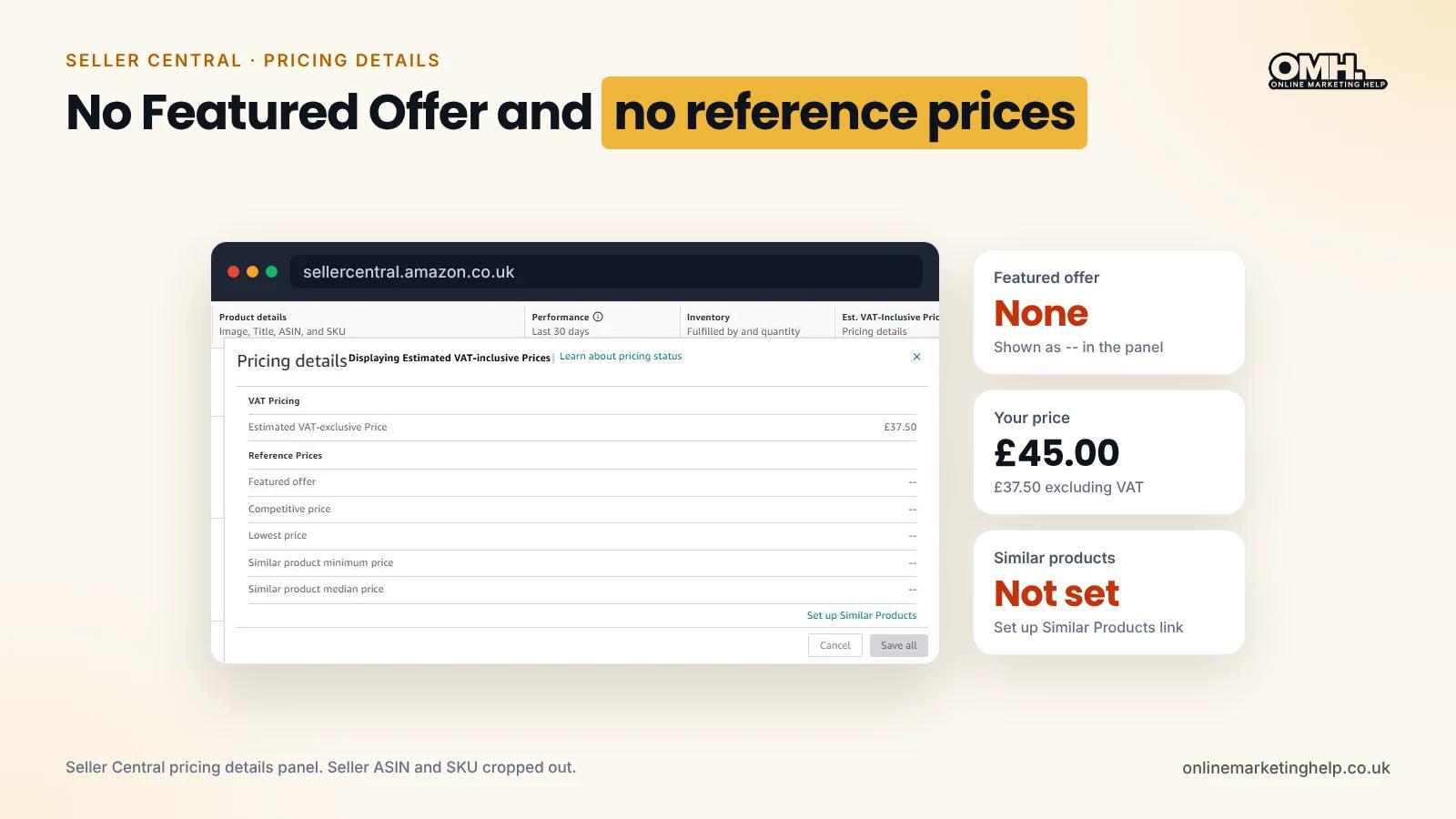
When we reviewed the client’s Amazon UK listing, the information available to us showed:
- An active listing priced at £45.00.
- Stock available for sale.
- No visible policy warnings or account-performance problems in the checks described for this case.
In Seller Central, we opened Manage All Inventory → Pricing details → View reference prices. Several reference-price fields were blank, shown as “--”. The panel also showed a “Set up Similar Products” prompt.
These blank fields were a useful clue about missing reference-price information. They did not independently identify why the seller was not winning the Featured Offer.
What We Investigated—and What We Could Not Confirm#
We focused on the comparison information visible in Seller Central rather than immediately lowering the listing price. A competitor’s changing price, delivery promise or stock position may be relevant to a Featured Offer investigation, but we did not have documented competitor before-and-after data for this case. We therefore cannot say that a particular competitor change caused the loss.
Likewise, an incomplete similar-products set can affect the benchmarks displayed in Product Comparison, but the available evidence does not establish that editing those comparisons directly controls Amazon’s Featured Offer decision.
Our Seller Central Troubleshooting Steps#
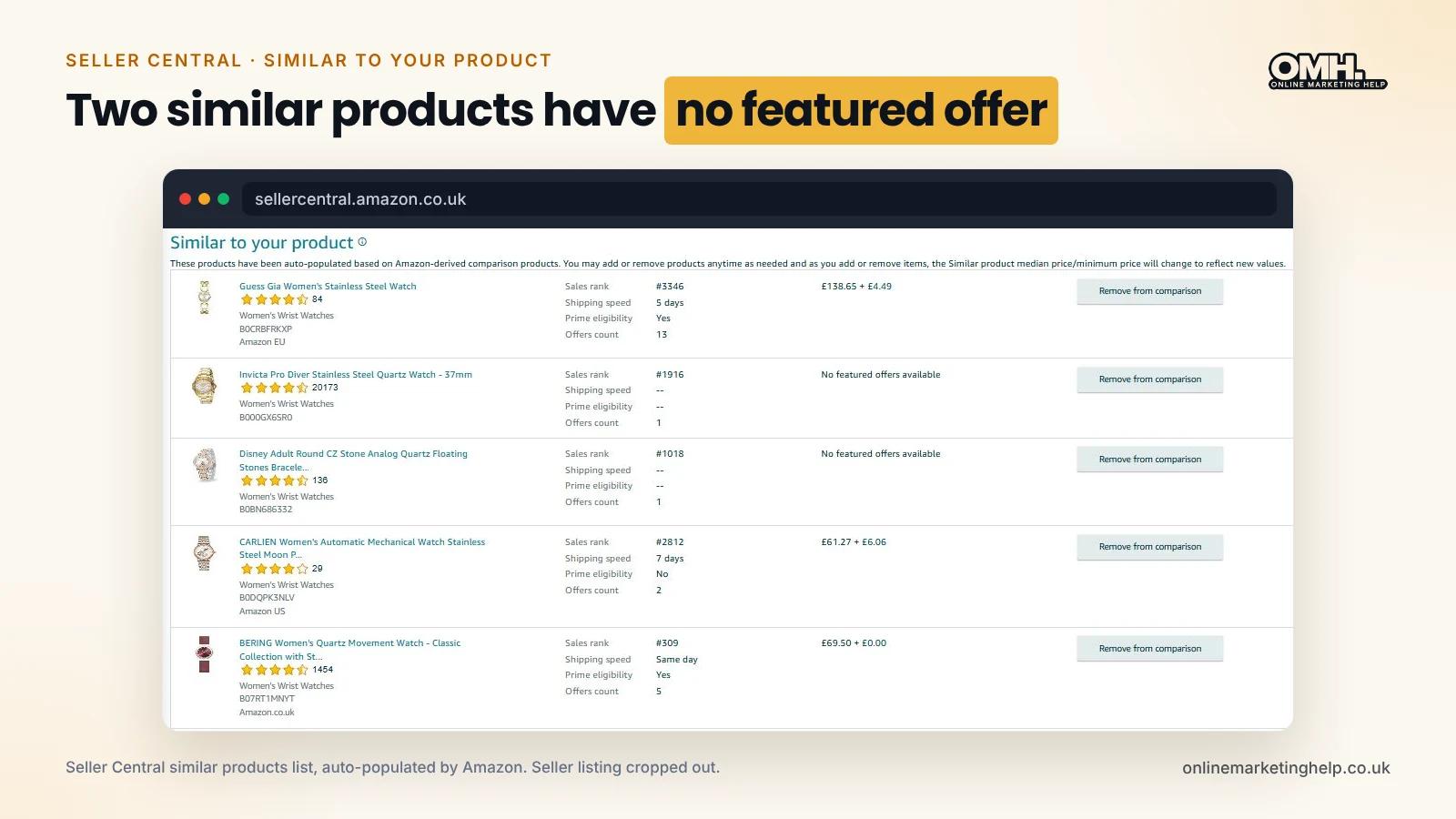
Step 1: Review the Product Comparison panel
We opened Product Comparison and reviewed the products listed under “Similar to your product”. We checked whether the existing examples were meaningfully comparable to the client’s product.
Step 2: Check the relevance of existing comparisons
We identified entries that appeared less useful as price benchmarks, including products without a visible Featured Offer, products associated with different marketplaces, and offers with substantially different delivery conditions. These were reviewed for removal from the comparison set.
Step 3: Add more relevant similar products
We retained or selected products more closely aligned with the UK listing, taking account of category, product comparability, delivery and availability. We also considered Prime eligibility and sales-rank signals when reviewing candidates. These were judgement calls for improving the comparison set—not proven Buy Box ranking levers.
Step 4: Save and recheck the pricing panel
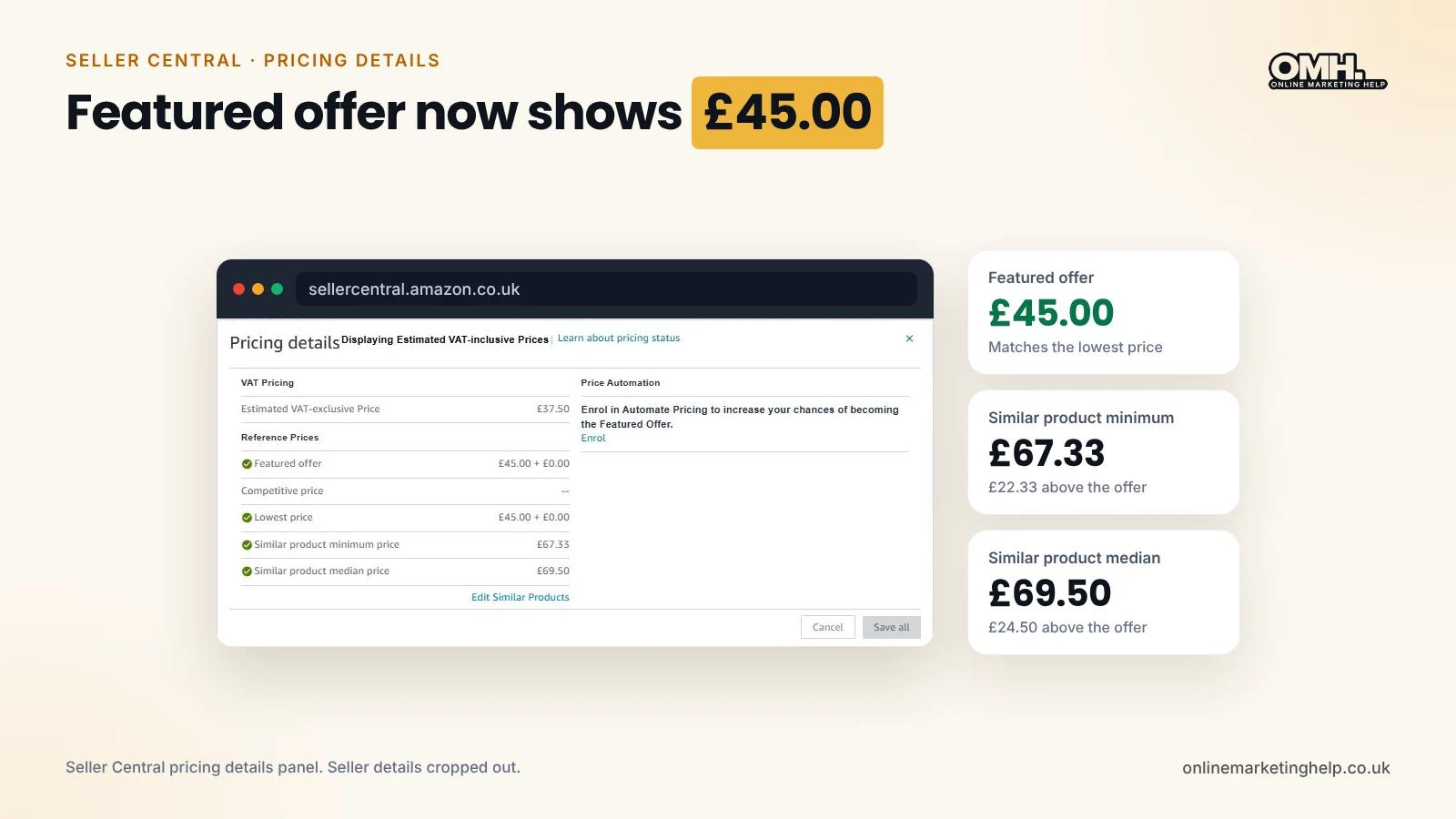
After saving the changes, we allowed the panel time to update and checked “View reference prices” again. The reference-price display changed as shown below.
Before and After: What the Reference-Price Panel Showed#
| Reference-price field | Before | After |
|---|---|---|
| Featured offer | -- | £45.00 + £0.00 |
| Competitive price | -- | -- |
| Lowest price | -- | £45.00 + £0.00 |
| Similar product minimum | -- | £67.33 |
| Similar product median | -- | £69.50 |
Following the comparison review, the panel displayed a featured offer reference price and lowest price of £45.00, as well as minimum and median similar-product prices of £67.33 and £69.50. The competitive-price field remained blank.
The client’s £45.00 listing price was below those displayed similar-product benchmarks. However, the comparison is descriptive: those figures alone cannot establish that the listing was eligible for, or selected as, the Featured Offer. The “Featured offer” price shown in a reference-price panel is not necessarily confirmation that the client’s seller account held the Buy Box.
Did Our Client Regain the Buy Box?#
The records documented in this case confirm that Seller Central’s reference-price panel populated additional pricing data after our comparison review. They do not include direct confirmation that the client’s seller offer became the featured offer again. To verify a recovery claim, we would need a dated product-page screenshot showing the client as the featured seller, a verified Seller Central Featured Offer status, or an equivalent account-level record.
For this reason, this article describes the investigation and the observable reference-price changes, rather than attributing a confirmed Buy Box recovery to the Product Comparison edits.
Checklist: What to Check When Your Amazon Buy Box Disappears#
- Confirm whether your own offer is currently featured, merely not winning, or ineligible for Featured Offer placement. These are not identical situations.
- Check listing status, inventory availability and fulfilment or delivery estimates.
- Review account health and performance indicators for any visible issues.
- Assess your total landed price, including delivery, and compare it with relevant competing offers.
- Review reference-price fields and similar-product benchmarks in Seller Central. Treat missing values as an investigation clue, not a diagnosis.
- Check whether advertising eligibility or visibility has changed; do not assume Sponsored Products continues spending on a product that has become ineligible.
- Record changes and confirm the outcome with the Featured Offer status of your own seller account before declaring the issue resolved.
Avoid automatically cutting your price without understanding the available evidence. A discount can reduce margin without addressing the actual issue.
Frequently Asked Questions#
Why did my Amazon Buy Box disappear if my listing is still active?
An active listing does not guarantee that your offer will be selected. Pricing, delivery, availability, seller performance and other marketplace considerations can all be relevant. Start by checking your actual Featured Offer status and offer competitiveness.
Do blank reference prices mean my listing is ineligible?
Not necessarily. Blank reference-price fields tell you that specific benchmark values are not displayed. They are not, by themselves, proof of featured offer ineligibility.
Will updating similar products restore the buy box?
There is no basis to guarantee that it will. Similar-product comparisons can help with pricing visibility and review, but the results documented here do not prove a direct causal effect on Featured Offer selection.
Should I lower my price immediately?
Not always. Compare the total offer price with relevant competitors and check other eligibility or operational issues first. Any price change should be based on the evidence and your commercial margins.
Can losing the featured offer affect sponsored products?
Yes. Amazon requires products advertised through Sponsored Products to be eligible for Featured Offer placement; products that lose that eligibility may stop displaying ads. Not currently winning the featured offer is different from being ineligible.
Need Help Investigating an Amazon UK Featured Offer Issue?
Online Marketing Help supports Amazon sellers with pricing reviews, listing and inventory checks, account-health analysis and broader Amazon store management. If your Featured Offer has disappeared or sales have changed unexpectedly, contact our team to discuss an initial account review and a practical investigation plan.
Keep reading
Related insights
Paid Advertising
How Should You Select the Best Advertising Platform for Your Business in 2024?
Choosing the right advertising platform is crucial in 2024. Understand trends, AI, and the best advertising platform strengths to align with your business goals
Read articlePaid Advertising
How Much Should a Typical Small Business Spend on Advertising?
Discover how much a typical small business should spend on advertising. Explore factors, benchmarks, and case studies for effective advertising strategies.
Read articlePaid Advertising
How to Advertise My Business on Google for Free
Advertise on Google for free, boost visibility, connect with a wider audience, and improve brand awareness. Learn effective strategies with Google My Business.
Read articleTurn useful ideas into a practical growth plan.
Tell us what you want to improve and what you have tried so far. We will help you identify the clearest next step.
What happens next
- Review the current position
- Define the commercial objective
- Agree the work and measurement