

Websites & Ecommerce1 min read
How To Add A New WordPress Admin User
This Blog will teach you how to add a new WordPress admin user. You will need this information if you are wanting to give someone access to your WordPress site.

- Written by
- Melissa Cross
- Published
- 28 October 2022
- Updated
- 13 October 2026
Creating an admin user with administrator privileges on WordPress is a straightforward process.
For those involved in WordPress development, we suggest setting up a temporary admin user that automatically expires after a certain period.
Follow the steps below to create an admin user without the need for any WordPress plugins.
How to add a new WordPress administrator to a self-hosted site.#
1) Go to your WP Admin Login Page and login and press Dashboard.
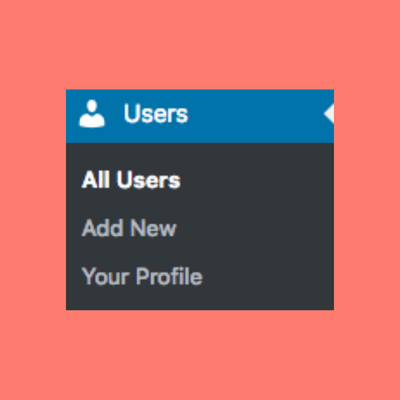
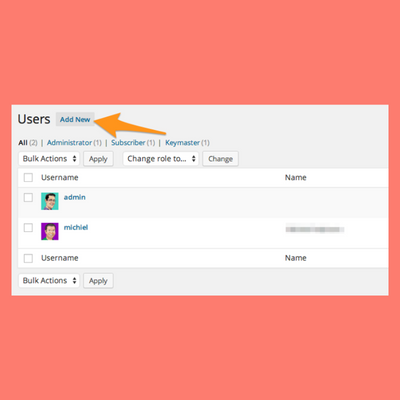
2) On the left-hand side near the bottom you should see "USERS". Click on users. 3) Click ‘Add New’. Across the top, click the ‘Add New’ button.
4) Fill out the form and set the role to Administrator. Please add Online Marketing Help as the User Name and [email protected] as the mail address If you’re creating the account for us, please tick the ‘Send User Notification’.
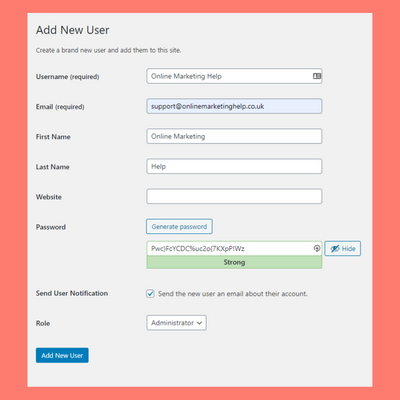
5) Click ‘Add New User’. At the bottom of the form, click the ‘Add New User’ button.
Keep reading
Related insights
Websites & Ecommerce
Shopify vs WordPress for UK Online Stores: Which Is Right for You?
Shopify vs WordPress for UK online stores: real 2026 costs in pounds, SEO, VAT, payment fees and Google Trends data to help you pick the right platform.
Read articleWebsites & Ecommerce
5 Website Maintenance Tasks UK Business Owners Often Overlook
Most UK business websites miss these 5 website maintenance tasks. Learn what to check, how often, and how to avoid lost leads, hacks, and ranking drops.
Read articleWebsites & Ecommerce
How to Choose the Right Web Development Partner in the UK
Choosing a web development partner in the UK? Our 2026 guide covers real costs, red flags, contracts, questions to ask, and what Google Trends reveals.
Read articleTurn useful ideas into a practical growth plan.
Tell us what you want to improve and what you have tried so far. We will help you identify the clearest next step.
What happens next
- Review the current position
- Define the commercial objective
- Agree the work and measurement