Ecommerce
Shopify vs WordPress for UK Online Stores: Which Is Right for You?
Online Markrting Help.co.uk

Choosing a web development partner in the UK can feel like a minefield. Type “web design agency” into Google and you will get hundreds of results, all promising beautiful websites, fast turnaround and page-one rankings. Then the quotes come in, and one agency says £800 while another says £12,000 for what sounds like the same thing. So how do you know who to trust?
We have been on the other side of this conversation for over 15 years. At Online Marketing Help, we build and look after websites for UK businesses every week, and a good part of our work is fixing sites that were built by someone else and never quite worked. Honestly, most of those problems could have been avoided with the right questions at the start. This guide gives you those questions, along with realistic UK prices, the red flags to watch for, and what the latest search data says about how businesses are buying websites in 2026.
Quick answer
The right web development partner is one that understands your business goals, shows you live websites and real results, explains costs clearly, builds with SEO, speed, accessibility and security in mind, and gives you full ownership of your website, domain and logins.
Always compare at least three quotes, speak to past clients, and read the contract before you pay a deposit.
Your website is usually the first place a customer checks before they call, visit or buy. According to the government’s UK Business Data Survey 2026, 78% of UK businesses now have a website, up from 68% two years earlier. That rises to 92% of small businesses and 97% of medium-sized ones. Having a website no longer makes you stand out. Having a good one does.
The same survey found that around a quarter of businesses (24%) have their website managed entirely by an external developer or platform, and another 29% use a mix of in-house and outside help. In other words, more than half of UK businesses rely on someone else to keep their website running. That makes the choice of partner a long-term business decision, not a one-off purchase.
Security is another reason to choose carefully. The Cyber Security Breaches Survey 2025/2026 found that 43% of UK businesses identified a cyber breach or attack in the last 12 months, including 42% of micro businesses and 46% of small businesses. Yet only 15% of businesses reviewed the cyber risks posed by their immediate suppliers. Your web developer has the keys to your website, your hosting, and often your customer data, so they are one of the suppliers you should be checking.
We looked at Google Trends and published search data to see how UK businesses are looking for website help right now.
1. DIY website builder searches are fallin
Research by Nomada Digital, reported in September 2025, found a 33% year-on-year fall in UK Google searches for “website builder”, with London down 33% and Manchester down 19%. Over the same period, searches for “freelance website builder” rose by 40%. That points to a clear shift: more businesses are deciding to get professional help rather than build a site themselves.
2. AI website builders are booming at the same time.
On the other side, AI tools have made it very easy to get a basic website online. Hostinger says more than one million people have built sites with its AI builder, and 93% to 95% of them had never had a paid website before. Developers are using AI too: 84% use or plan to use AI coding tools, according to the Stack Overflow Developer Survey 2025.
This matters when you are comparing quotes. AI means a simple website can be produced very quickly and cheaply, so a low price is no longer a sign of a clever deal. What you are really paying a web development partner for now is the thinking: strategy, structure, SEO, speed, security, accessibility, and support. Those are the parts AI tools do not do for you.
3. Local intent is strong
Search terms like “web design near me” and “web developer near me” remain popular in the UK because many business owners still want someone they can speak to and ideally meet. If you are a local business yourself, this is also a reminder of how your own customers search and why local SEO should be part of any new website project.
How to check the trend yourself
Open Google Trends, set the location to United Kingdom and the time range to “Past 5 years”, then compare “web design agency”, “website builder” and “web developer”. Google Trends shows relative interest on a scale of 0 to 100 rather than actual search numbers, so use it to spot direction and seasonality, not volume.
What this means for you
More businesses are paying for professional help, and more cheap, fast options are appearing at the same time. That gap between the cheapest quote and the best-value quote has never been wider, so the rest of this guide focuses on how to tell them apart.
Before you start comparing companies, decide what type of partner suits you. There is no single right answer, and we have seen great results from all three.
DIY / AI builder | Freelancer | Agency | |
|---|---|---|---|
Typical UK cost | £0 to £29 a month | £500 to £10,000 per project | £3,000 to £30,000+ |
Best for | Very simple sites, testing an idea | Smaller sites with a clear brief | Business-critical sites, e-commerce, ongoing marketing |
Skills | Just you | One person, often a specialist | Designers, developers, SEO and content under one roof |
Speed | Fast to launch | Depends on their workload | Structured timelines |
Risk | Limited SEO and flexibility | Holidays, illness, or the freelancer moving on | Higher cost; check who actually does the work. |
Support after launch | Platform help only | Varies | Usually formal support and maintenance plans |
Price ranges are typical UK figures compiled by ExpertSure (verified August 2026). London agencies often charge more.
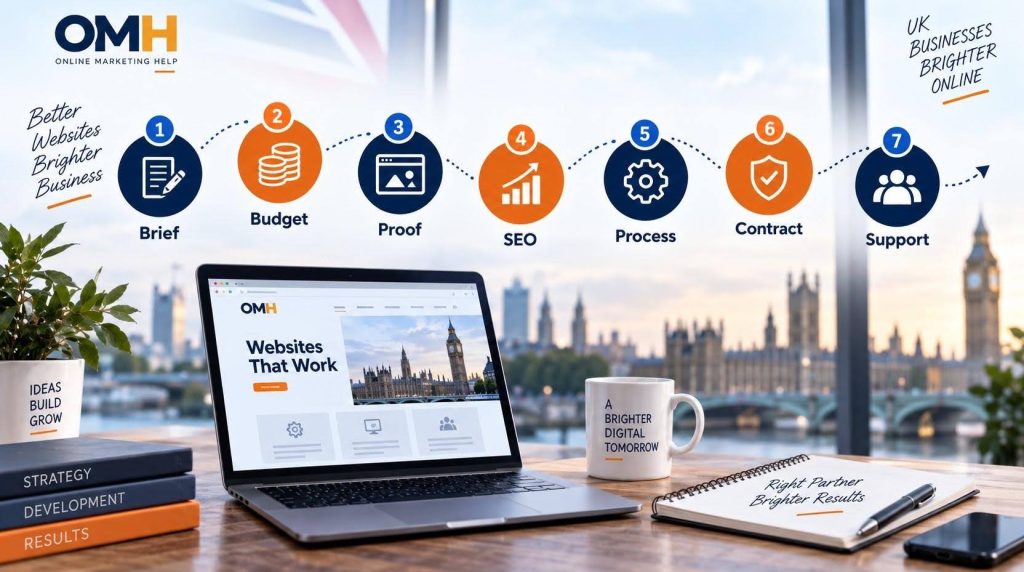
The best web development projects start with a clear brief. It does not need to be long or technical. A single page answering these questions will make every quote you receive more accurate and easier to compare:
If you are not sure which platform you need, that is fine. A good partner will recommend one based on your goals rather than their own preference. If you run an online shop, our guide to Shopify vs WordPress for UK online stores is a useful starting point.
Website prices in the UK vary hugely, mainly because “a website” can mean anything from a five-page brochure site to a custom platform. Here are typical 2026 ranges:
Type of website | Typical UK cost |
|---|---|
Basic brochure site (3 to 5 pages) | £500 to £1,500 |
Standard business website (5 to 10 pages) | £1,500 to £3,000 |
Larger business site with a CMS (10 to 20 pages) | £2,000 to £5,000 |
E-commerce website | £3,000 to £10,000 |
Complex custom build | £10,000 to £50,000+ |
Source: ExpertSure UK website cost guide, prices verified August 2026.
Do not forget ongoing costs. Hosting, domain renewal, security updates, backups, and small content changes typically add £50 to £300 a month depending on the size of the site and the level of support. Ask every agency to show these separately so you can compare the true cost over two or three years rather than just the build price.
At Online Marketing Help, we publish our price list because we think you should know roughly what things cost before you pick up the phone. A partner who will not give you any idea of pricing until you have sat through a long sales call is worth being cautious about.
Every agency website says it is award-winning and results-driven. Here is how to check whether the claims stand up.
Look at live websites, not just screenshots
Ask for links to live sites they have built, ideally in your industry or of a similar size. Open them on your phone. Are they quick to load? Easy to use? Do the forms work? A portfolio of pretty images tells you very little. A live site tells you a lot.
Ask for results, not just designs
A website is a business tool, so ask what happened after launch. Did enquiries go up? Did the site rank for anything? Good agencies will have case studies or be happy to talk you through real examples.
Read independent reviews
Check Google reviews, Clutch and Trustpilot rather than relying on testimonials the agency picked for its own website. Look for detail in the reviews: specific names, projects and how problems were handled.
Speak to a past client
Ask if you can talk to one or two existing clients. Any established agency should be able to arrange this. Ask them how the project went, whether it was on time and budget, and how the agency handles support now.
Check the business is real and stable
Look the company up on Companies House to see how long it has been trading and whether its accounts are up to date. Check it has a UK address and phone number. If it claims to be a Google Partner, you can confirm this on the Google Partners site. A Cyber Essentials certificate is also a good sign that the business takes security seriously.
A good-looking website that nobody finds, loads slowly, or cannot be used by everyone is not a good website. These are the areas we see skipped most often in cheap builds.
SEO from day one
SEO should be built in, not bolted on later. Ask how they handle page structure, headings, meta titles, internal linking, schema markup, and redirects from your old site. If you are replacing an existing website, a poorly planned move can lose years of Google rankings overnight. Our SEO services team often gets called in after exactly this has happened, and it is much cheaper to get it right the first time.
It is also worth asking how they prepare sites for AI search. With Google’s AI Overviews and tools like ChatGPT answering more questions directly, clear structure and helpful content matter even more. We cover this in our guide to zero-click searches and AI Overviews.
Speed and Core Web Vitals
Google measures real-world page experience through Core Web Vitals: how quickly the main content loads, how fast the page responds when someone taps or clicks, and how stable the layout is while it loads. Ask your developer what scores their recent sites achieve and how they get there, for example through good hosting, image optimisation, caching and a content delivery network.
Accessibility
Under the Equality Act 2010, UK businesses that provide services to the public should make reasonable adjustments for disabled people, and that includes websites. The recognised standard is WCAG 2.2 at level AA. If you sell to customers in the EU, the European Accessibility Act also applies to many online services from June 2025. Ask any potential partner how they test for accessibility. If they look blank, keep looking.
Security and data protection
Ask who is responsible for updates, backups and security monitoring, and how quickly they respond if something goes wrong. If your website collects customer data through forms, bookings or payments, your developer may be acting as a data processor under UK GDPR, and the ICO expects a written contract covering how that data is handled. A reputable partner will be comfortable talking about all of this.
Ask each shortlisted partner to walk you through how a project runs from start to finish. A clear process usually looks something like this:
Communication matters as much as technical skill. Find out who your main point of contact will be, how often you will get updates, and how quickly they reply to emails. In our experience, projects rarely go wrong because of the code. They go wrong because expectations were never agreed.
This is the step people skip, and it is the one that causes the most heartache. Before you pay a deposit, make sure the contract or proposal clearly covers:
A website is never really finished. Plugins need updating, content needs refreshing, and Google keeps changing. Ask every partner what happens after launch:
A partner who can support you after launch saves you from having to brief a new company every time you need a change.
Copy these into your notes and ask them on every call. The answers will quickly show you who knows their stuff.
If you want to see how well-regarded UK companies compare, we have also put together a list of the best WordPress development companies in the UK.
We would not write a guide like this without holding ourselves to it. Here is how we approach every project:
We also tell people when they do not need us. If a simple DIY site will do the job for now, we will say so.
How much should I pay for a website in the UK?
Most small UK businesses pay between £1,500 and £5,000 for a professionally built website, with e-commerce sites typically £3,000 to £10,000. Ongoing hosting and maintenance usually add £50 to £300 a month. Complex custom builds can cost much more.
Should I choose a freelancer or an agency?
A freelancer can be a great choice for a smaller site with a clear brief and a tighter budget. An agency is usually better for business-critical websites, e-commerce, and projects that need design, development, SEO, and ongoing support together, because you are not relying on one person.
How long does it take to build a website?
A small business website typically takes four to eight weeks, and an e-commerce or custom site can take two to four months. The biggest cause of delay is usually content, so have your text and images ready early.
Does my web developer need to be based in the UK?
Not necessarily, but a UK-based partner makes communication easier, works in your time zone, and understands UK rules such as UK GDPR, VAT and consumer law. If you do choose an overseas developer, be extra careful about contracts, ownership and access.
Who should own my website and domain?
You should. Make sure your domain is registered in your business name and that you have admin access to your website and hosting. This should be written into your contract.
Can AI build my website instead of a developer?
AI builders can produce a basic website quickly, and they can be fine for testing an idea. They will not plan your SEO, protect your rankings during a redesign, check accessibility, or support you when something breaks. For a website your business depends on, you still need experienced people involved.
If you are weighing up quotes or planning a new website, we are happy to help, even if you just want a second opinion on a proposal from someone else. Book a free consultation with our team, or start with a free website audit to see where your current site stands.
Online Markrting Help.co.uk
Online Markrting Help.co.uk
You have unsubscribed. Thanks!