

SEO12 min read
Does Changing Your Domain Name Affect SEO? What Happens to Rankings and Backlinks
Changing your domain can affect SEO rankings, traffic and backlinks. Learn how to protect your SEO and recover from traffic drops.
- Written by
- Melissa Cross
- Published
- 19 October 2026
- Updated
- 28 October 2026
You switched to a new domain after a rebrand. A week later, Search Console shows fewer clicks, your SEO tool says the new domain has almost no authority, and someone in the office asks whether the website has "lost its Google rankings".
Yes, changing your domain name can temporarily affect your Google rankings and organic traffic. However, a properly managed domain migration with page-to-page 301 redirects helps Google transfer ranking signals to the new URLs. Your backlinks remain on the websites linking to you, and their value can continue to support the new domain through redirects. Recovery time varies, so monitoring Google Search Console is essential.
In this guide
- Does changing your domain name affect SEO?
- What happens to Google rankings?
- What happens to backlinks?
- What happens to Domain Authority?
- Which redirects protect SEO?
- What if you moved without redirects?
- Why has organic traffic dropped?
- How long does recovery take?
- How to check rankings and backlinks are preserved
- Should you keep the old domain?
Does changing your domain name affect SEO?
Yes. Changing your domain name affects SEO because Google sees a completely new set of URLs, even if every page looks the same. It has to discover the new addresses, follow the redirects and transfer ranking signals from the old pages. Google's site move guidance says visibility may fluctuate temporarily while this happens.
This applies to any domain change: a rebrand from old-name.co.uk to new-name.co.uk, a move from .org to .com, or merging two websites into one. During the move, you will usually notice:
- Keyword positions moving up and down.
- Old URLs still appearing in Google next to new ones.
- Indexed page counts falling on the old domain and rising on the new one.
- Backlink and authority scores in SEO tools looking lower than before.
A domain change moves your SEO history to a new address; it only destroys it when the old and new URLs are not connected.
What happens to Google rankings after a domain change?
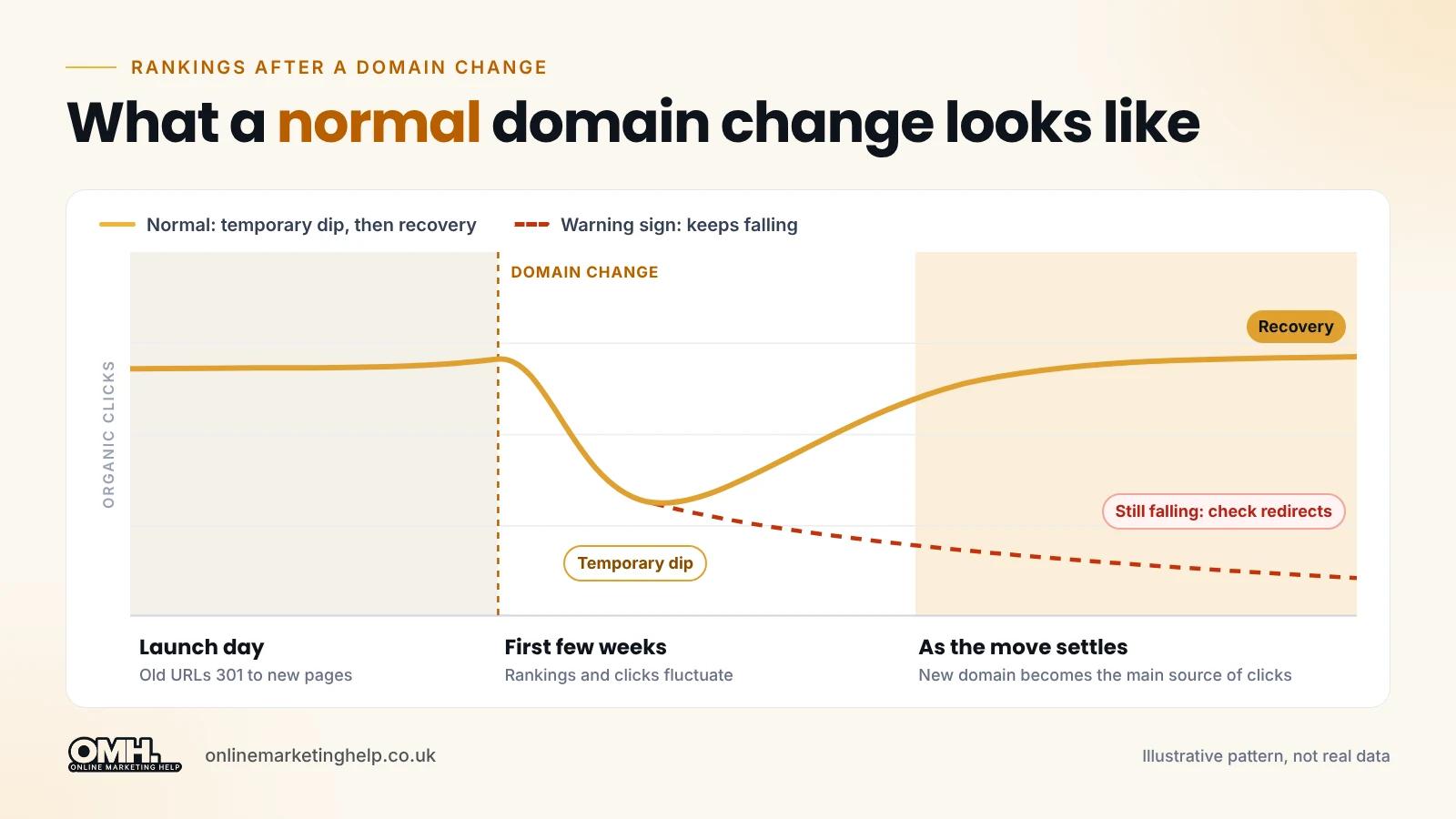
Your rankings may fluctuate after a domain change, but that does not necessarily mean you have permanently lost your SEO visibility. If each old page permanently redirects to its matching new page, Google moves the ranking signals across and gradually swaps the old URLs for the new ones in search results. Pages Google crawls often move first, so some keywords settle quickly while others move around for longer.
Take a service page ranking third for an important keyword at example.co.uk/services/. After the move, the same page lives at newbrand.co.uk/services/. With a 301 redirect in place, Google can tell the page has moved rather than vanished, but the new URL may still move up or down for a while before it settles.
What a normal domain change looks like
| Stage | What is normal | Warning sign |
|---|---|---|
| Launch day | Old URLs return a 301 to the matching new page, and new pages return 200 | Old URLs return 404s, or everything redirects to the homepage |
| First few weeks | Rankings and clicks fluctuate; old and new URLs both appear in Google | New pages are not being indexed at all |
| As the move settles | The new domain becomes the main source of indexed pages and clicks | Traffic to key pages keeps falling with no sign of recovery |
These stages are a guide, not deadlines. If the warning signs appear, investigate straight away rather than waiting for Google to catch up.
What happens to backlinks when you change your domain?
Your backlinks stay exactly where they are: on other websites, pointing at your old URLs. They do not update themselves. A permanent 301 redirect sends visitors and search engines from the old URL to the new page, so the link keeps working and Google can pass its value to the new address.
This is what the journey looks like for a link from an industry website:
# Before the move
industrysite.co.uk  ->  example.co.uk/report/

# After the move, with a 301 redirect
industrysite.co.uk  ->  example.co.uk/report/  ->  newbrand.co.uk/report/

# Best result, once the publisher updates the link
industrysite.co.uk  ->  newbrand.co.uk/report/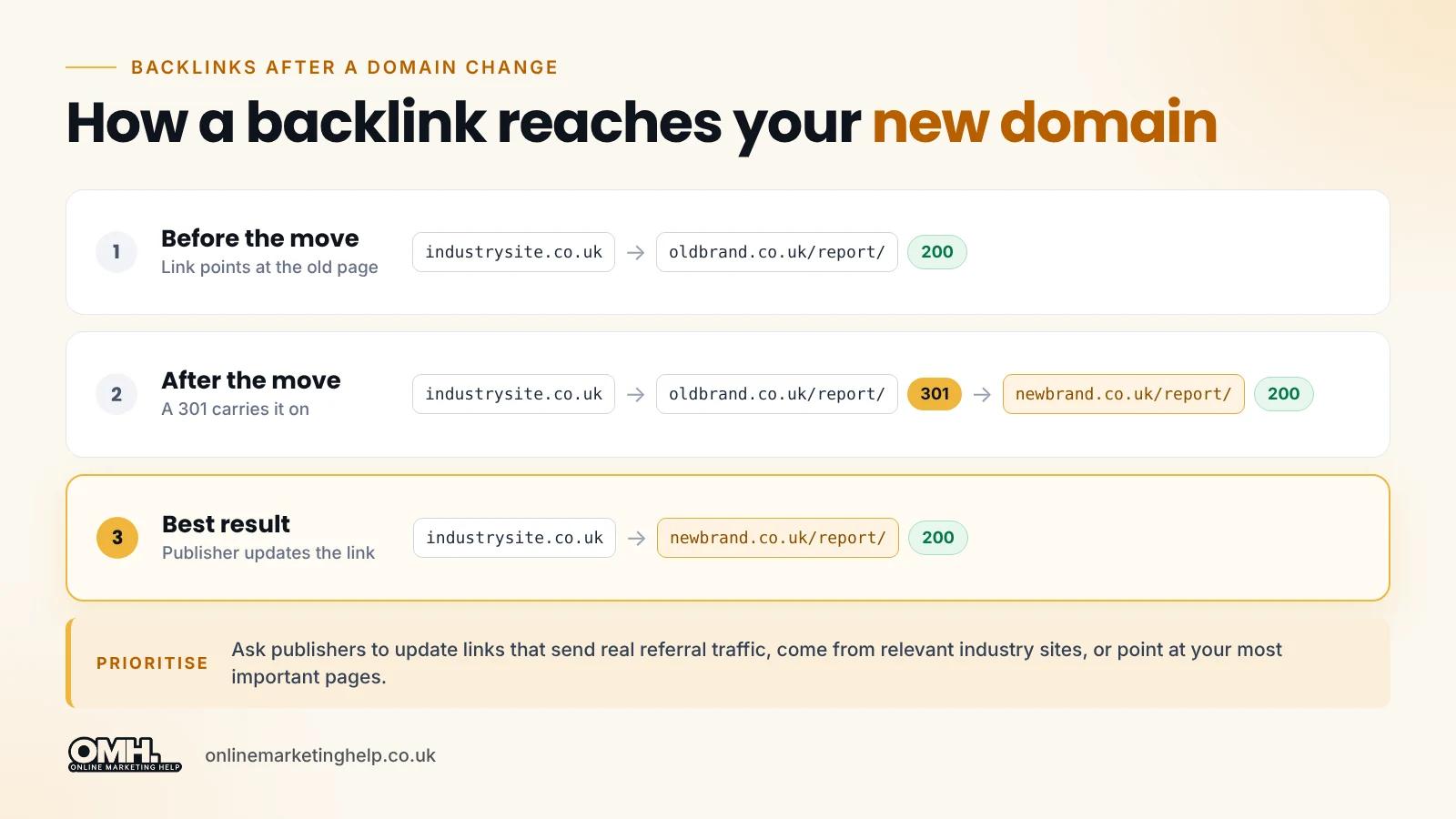
Do backlinks pass their value through a redirect?
Yes, in most cases. Google's Gary Illyes said in 2016 that 30x redirects no longer lose PageRank, and Google treats a 301 as a strong signal that the new URL should replace the old one. This works best when each old page redirects to its true equivalent. A link to a deep article that lands on the new homepage carries far less meaning.
Which backlinks should you ask to update?
You do not need to chase every link. Start with the ones that matter most:
- Links that send real referral traffic.
- Links from relevant industry publications, associations and partners.
- Links to your commercially important pages.
- Links you control: your Google Business Profile (important for local SEO), social profiles, directories and email signatures.
What happens to Domain Authority after a domain change?
Domain Authority (Moz), Domain Rating (Ahrefs) and Authority Score (Semrush) are third-party scores calculated from each tool's own link index. Google does not use them. A brand-new domain often shows a low score at first, simply because the tool has not yet followed your redirects. That does not mean Google has thrown away your ranking signals.
Judge the migration on what Google actually reports: indexed pages, clicks and impressions in Search Console, and enquiries and sales in GA4. Treat third-party authority scores as a lagging indicator, not a verdict.
Which redirects protect SEO during a domain change?
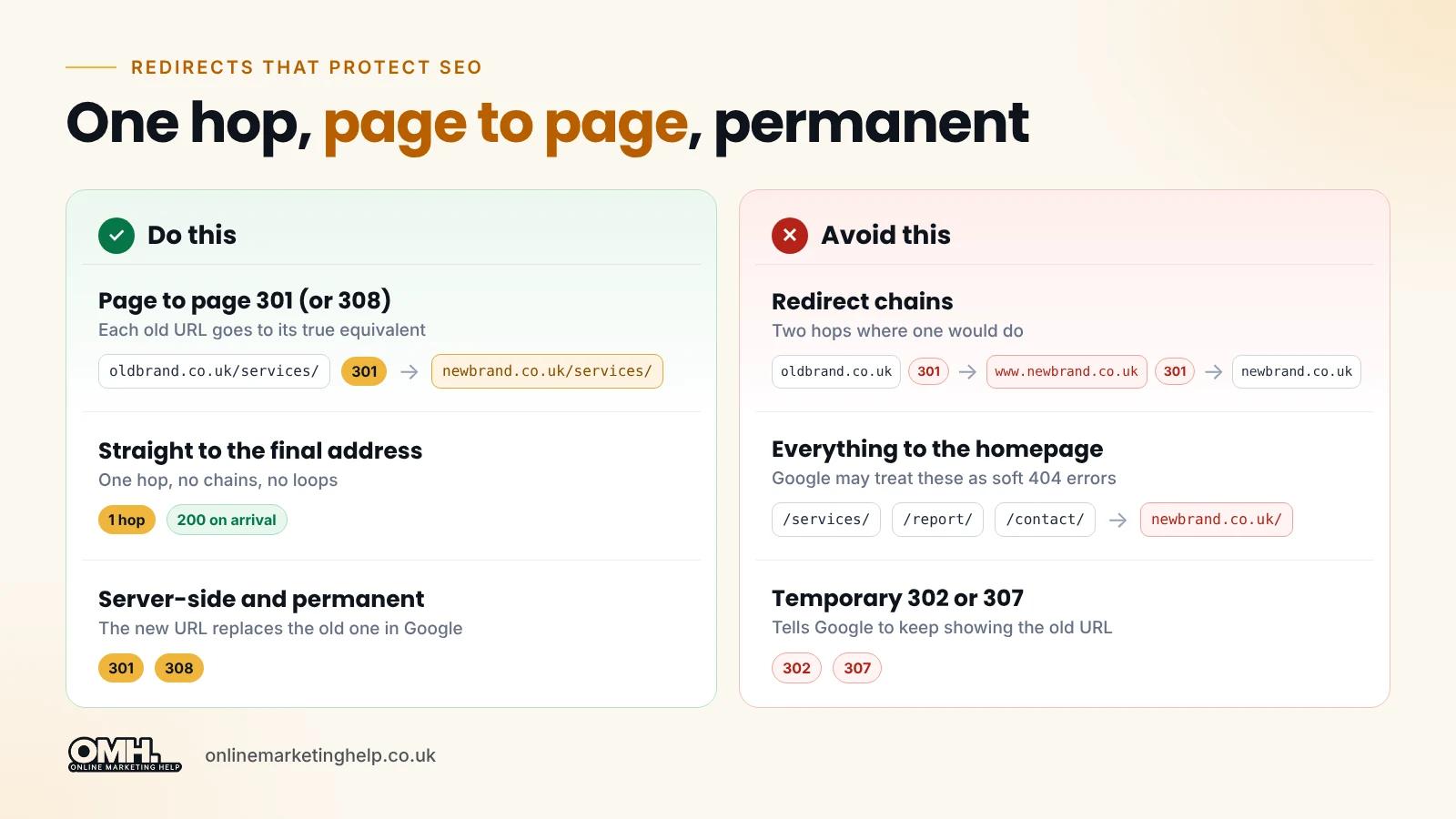
Use permanent server-side redirects: a 301, or a 308, which Google treats the same way. They tell Google the move is permanent, so the new URL replaces the old one in search results. Temporary redirects (302 or 307) tell Google to keep showing the old URL, which is the opposite of what a domain change needs.
For most website owners, a permanent 301 redirect is the simplest and most reliable option when moving to a new domain.
| Redirect type | What it tells Google | Use it for a domain change? |
|---|---|---|
| 301 (server-side) | Permanent move; the new URL should replace the old one | Yes, the standard choice |
| 308 (server-side) | Permanent move; Google treats it the same as a 301 | Yes |
| 302 / 307 | Temporary move; the old URL stays in search results | No |
| Instant meta refresh | Google reads it as permanent | Only if server redirects are impossible |
| JavaScript redirect | Only seen if Google renders the page successfully | Last resort only |
Google's own guide to redirects and Google Search says a permanent server-side redirect has the best chance of being read correctly. Also avoid chains such as example.co.uk/page/ to www.newbrand.co.uk/page/ to newbrand.co.uk/page/. Send every old URL straight to its final address in one hop.
What happens if you change domains without 301 redirects?
Without redirects, Google treats the new domain as an unrelated website. Old URLs return errors, backlinks lead to dead pages, and the new pages have to earn their rankings from scratch. For an established site, that can mean a sharp and lasting fall in organic traffic, enquiries and sales.
- Years of backlinks point at pages that no longer exist.
- Bookmarks, old emails and printed materials stop working.
- Google takes much longer, if ever, to connect the old and new sites.
- Redirecting everything to the new homepage does not fix this, because Google may treat those redirects as soft 404 errors.
Already moved without redirects? How to recover
The sooner you act, the more you can usually recover. Recovery is not guaranteed, but these steps give Google the connection it was missing:
- Rebuild the list of old URLs. Export pages from the old Search Console property, an old XML sitemap, the "top pages" report in a backlink tool, or the Wayback Machine.
- Bring the old domain back online. Point its DNS at a server and install a valid SSL certificate, so https links can redirect without a security warning.
- Add page-to-page 301 redirects from each old URL to its matching new page.
- Test a sample with a crawler or curl -I, checking for one 301 hop followed by a 200.
- Use the Change of Address tool in Search Console, if the move is a whole domain and both properties are verified.
- Submit the new sitemap and monitor both properties weekly.
Why has my organic traffic dropped after a domain change?
A short dip is normal while Google processes the move. A drop that keeps going usually has a technical cause: old URLs returning errors, redirects to the wrong pages, canonicals still pointing at the old domain, pages blocked from Google, or analytics not set up on the new domain. Work through the checks below before assuming Google is simply slow.
| Symptom | Likely cause | How to check and fix |
|---|---|---|
| Old URLs show 404 errors | Missing redirects | Crawl the old URL list; add page-to-page 301s |
| Deep pages lost rankings, homepage fine | Everything redirected to the homepage | Map each old page to its true equivalent |
| Search Console reports that Google chose a different canonical | Canonical tags still point at the old domain | Use URL Inspection; set self-referencing canonicals on the new domain |
| New pages "Excluded by noindex tag" | Staging settings left on | Remove noindex; check robots.txt and X-Robots-Tag headers |
| GA4 shows almost no traffic, but Search Console clicks look normal | Tracking not installed or filtered on the new domain | Check the GA4 tag, data stream URL and Tag Manager triggers |
| Slow pages and many redirect hops | Internal links still use the old domain | Update menus, footers and in-text links to the new URLs |
| Competitors dropped at the same time | Seasonality or a Google algorithm update | Compare like-for-like periods and industry trends |
Always compare the same pages and the same search queries before and after the move. Site-wide totals hide the pages that are actually causing the problem.
For example: If your old domain previously received 1,000 clicks a week from Google Search, compare the combined clicks from both the old and new domains after migration rather than looking at the new domain alone. This helps you understand whether search visibility is transferring between domains or whether there is an actual drop in organic clicks.
How long does it take rankings to recover after a domain change?
There is no guaranteed recovery period. Google's site move documentation says a small to medium-sized website can take a few weeks for most pages to move, and larger sites take longer. Speed depends on the number of URLs, how fast your server responds and how often Google crawls the site.
Avoid big changes, such as a redesign or new URL structure, until the move has settled. If you need both, follow our advice on how to redesign your website without losing SEO. Google also recommends making site changes one after the other rather than all at once.
How do you check that rankings and backlinks are being preserved?
Use several sources rather than a single score. Compare both domains in Google Search Console, check organic conversions in GA4, test that backlinked URLs redirect correctly, and crawl the old URL list to catch errors. Together, these show whether Google is moving your signals across or whether something is blocking the move.
- Search Console (both properties): clicks, impressions and queries should move from the old property to the new one. In the old property, "Page with redirect" in the indexing report is expected.
- URL Inspection: check that the Google-selected canonical for key pages is the new URL.
- GA4: compare organic sessions, enquiries and sales against your pre-move baseline, after confirming tracking works.
- Backlink tool: export your top linked old URLs and confirm each one 301s to the right new page.
- Crawler: run your old URL list through Screaming Frog in list mode to find 404s, loops and chains.
For a quick spot check from the command line, this shows every hop for one URL:
curl -sIL https://example.co.uk/services/ | grep -iE "^HTTP|^location"How do you protect SEO before a domain change?
Protect SEO by planning the move before launch: record a baseline, keep content and URL paths the same, map every old URL to its new one, add permanent redirects, update canonicals, links and sitemaps, then tell Google through the Change of Address tool. Monitor closely for the first few months.
We cover each step in detail, with copy-and-paste .htaccess and Nginx rules, in our step-by-step guide to moving from .org to .com without losing SEO. The same process works for any domain change. Google's Change of Address tool only works for whole-domain moves where you own both properties in Search Console.
Should you keep your old domain after a domain change?
Yes. Keep the old domain registered and its redirects running. Google's site move guidance says to keep redirects for as long as possible, and generally at least one year. For an established website, keeping them permanently is safer, because old links stay live in articles, directories and documents for many years.
Never let the old domain expire. Someone else could register it and take advantage of your old backlinks and reputation, or use it to impersonate your business.
Frequently asked questions
Will I lose my backlinks if I change my domain?
No, not if you set up redirects. Backlinks stay on other websites, pointing at your old URLs. Page-to-page 301 redirects send visitors and search engines on to the matching new pages. For your most valuable links, ask the publisher to update the URL so the link points straight at the new domain.
Do 301 redirects transfer SEO value?
Yes, in most cases. Google's Gary Illyes said in 2016 that 30x redirects no longer lose PageRank, and Google treats a 301 as a strong signal that the new URL should replace the old one. It works best for one-to-one redirects to equivalent pages. Identical rankings are still not guaranteed.
Does a new domain start with zero authority?
Not in Google's eyes, if the old URLs redirect properly, because the ranking signals move with the redirects. Third-party scores such as Domain Authority or Domain Rating may start low on the new domain until the tools follow the redirects. Judge progress on Search Console data, not those scores.
Can I change my domain and redesign my website at the same time?
You can, but it makes problems much harder to diagnose. If rankings drop, you will not know whether the domain change, the new design or new URLs caused it. Google recommends making site changes one after the other. Move the domain first, let it settle, then redesign.
How long should I keep 301 redirects after a domain change?
Google recommends keeping redirects for as long as possible, and generally at least one year. For an established website with years of backlinks and bookmarks, keep them permanently. Keep the old domain registered as well, so nobody else can buy it and use your old links.
Final thoughts
Does changing your domain name affect SEO? It does, but a well-connected move puts your rankings and backlinks at a new address rather than throwing them away. Expect a temporary wobble, judge progress on Search Console rather than third-party scores, and treat a drop that keeps going as a technical problem to diagnose. Page-to-page 301 redirects, consistent content and close monitoring do most of the work.
If your rankings have dropped after a domain change, or you are planning one, book a Growth Consultation with Online Marketing Help, or explore our SEO services.
Keep reading
Related insights
SEO
Best AI receptionist UK: Five options compared for 2026
We compared five AI receptionists a UK business can sign up to now, with prices checked in 2026, what each one does badly, and the GDPR steps to take before you switch one on.
Read articleSEO
How to Move from .org to .com Without Losing SEO Value
Move .org to .com without losing SEO value: our step-by-step guide to URL mapping, 301 redirects, .htaccess rules and Google's Change of Address tool.
Read articleSEO
Claude SEO Audit Skill: How Our AI SEO Audit Found Casino Spam That Semrush Missed
Our Claude SEO audit skill found casino spam Semrush and Screaming Frog missed. See how this AI SEO audit works, how we removed the spam and how to build your own.
Read articleTurn useful ideas into a practical growth plan.
Tell us what you want to improve and what you have tried so far. We will help you identify the clearest next step.
What happens next
- Review the current position
- Define the commercial objective
- Agree the work and measurement