

SEO15 min read
Claude SEO Audit Skill: How Our AI SEO Audit Found Casino Spam That Semrush Missed
Our Claude SEO audit skill found casino spam Semrush and Screaming Frog missed. See how this AI SEO audit works, how we removed the spam and how to build your own.
- Written by
- Melissa Cross
- Published
- 6 October 2026
- Updated
- 21 October 2026
One of our ecommerce clients was losing ground in Google, and nobody could see why.
Pages that used to rank well started to slip. Impressions and clicks in Google Search Console fell with them. Yet our usual audits in Semrush and Screaming Frog found nothing wrong.
So we ran an AI SEO audit using a Claude SEO skill we built in-house. It found something our crawlers had missed: a casino spam injection. Hackers had hidden French-language gambling content, with links to an online casino, inside the client's WordPress store.
Here's how we found it, how we removed it and what it did to the site's SEO and sales. We also show you how to set up a Claude AI SEO Audit skill of your own.
What is SEO spam injection?#
SEO spam injection is when hackers break into a real website and add their own content and links to its pages. Casino spam injection is one type, where the content promotes gambling sites. The hackers want to borrow your site's standing in Google to push their pages up the rankings.
Google treats this as hacked content, and your site pays the price. SEO spam is often written in another language. The text and its hidden spam links tend to sit where you won't look:
- behind a "Read More" link that keeps most of the text folded away
- inside page builder data, such as Elementor layouts
- in widgets, footers or theme files
Google's spam policies list hidden text and links added through HTML or CSS as one form of content injection.
The challenge: a store that looked fine but kept losing ground#
Our client runs a WooCommerce store that sells seasonal products. Most of their sales come in during a few busy months. So their Google visibility in those months is worth more than at any other time of year.
Then the numbers started to fall:
- Rankings dropped across many pages.
- Impressions fell in Search Console.
- Clicks fell with them.
- Sales for the month came in below the same month last year.
On the surface, the site worked normally, and our technical audits didn't flag anything that explained the drop.
A traffic drop doesn't automatically mean a site has been hacked. Search demand, competitors, algorithm updates and technical problems can all play a part. So we went looking for the cause rather than assuming one.
For seasonal shops, ecommerce SEO is about timing as much as rankings. Every week of lost visibility in peak season costs sales you can't win back.
Why Semrush and Screaming Frog missed the hack#
Semrush and Screaming Frog are excellent tools. Both are still part of every technical SEO audit we run. They crawl a site and report technical problems, such as:
- broken links and redirect chains
- missing title tags and duplicate content
- slow pages and indexing errors
But they don't read a page and ask, "Does this belong here?" Neither tool is built to be an SEO spam checker.
To a crawler, 1,200 words of French casino copy is just more text. The casino link is one more external link. Neither counts as an error.
Three other things helped the hackers stay hidden:
- The "Read More" trick. The spam ended in a "[Read More]" link that went nowhere. This is a common way to keep most of the text folded out of view.
- You can only search for what you know. Screaming Frog's custom search can find any phrase across a site. But nobody searches for "1win" until they know it's there.
- Healthy status codes. Every page still loaded normally, so nothing looked broken.
What are Claude skills?#
Claude skills are folders of instructions, and sometimes scripts and templates, that teach Claude how to do a specific job. Claude reads each skill's short description and loads the full instructions only when a task matches. According to Anthropic's skills documentation, custom skills work in the Claude apps, in Claude Code and through the Claude API.
A Claude SEO skill (some people say SEO Claude skill) is a skill built for SEO work. Claude AI SEO skills can cover audits, keyword research or content checks. Your marketing team can use one in the Claude app, and your developers can run it as a Claude Code SEO skill.
The big win is consistency. Instead of writing a new prompt each time, Claude works from the same checklist on every site.
How our AI SEO audit found the casino spam#
Our Claude SEO Audit skill runs a full website audit and writes the report in sections. One section, Security, checks for hacking, malware and security vulnerabilities. Every finding gets a severity label, such as CRITICAL, and a "How to Fix" list.
The difference from a crawler is that it reads each page the way a person would. It runs the technical checks, then compares the content against what the business sells. Anything that doesn't fit gets flagged.
When we ran it on the client's site, it returned a critical security finding on the /shop/ page:
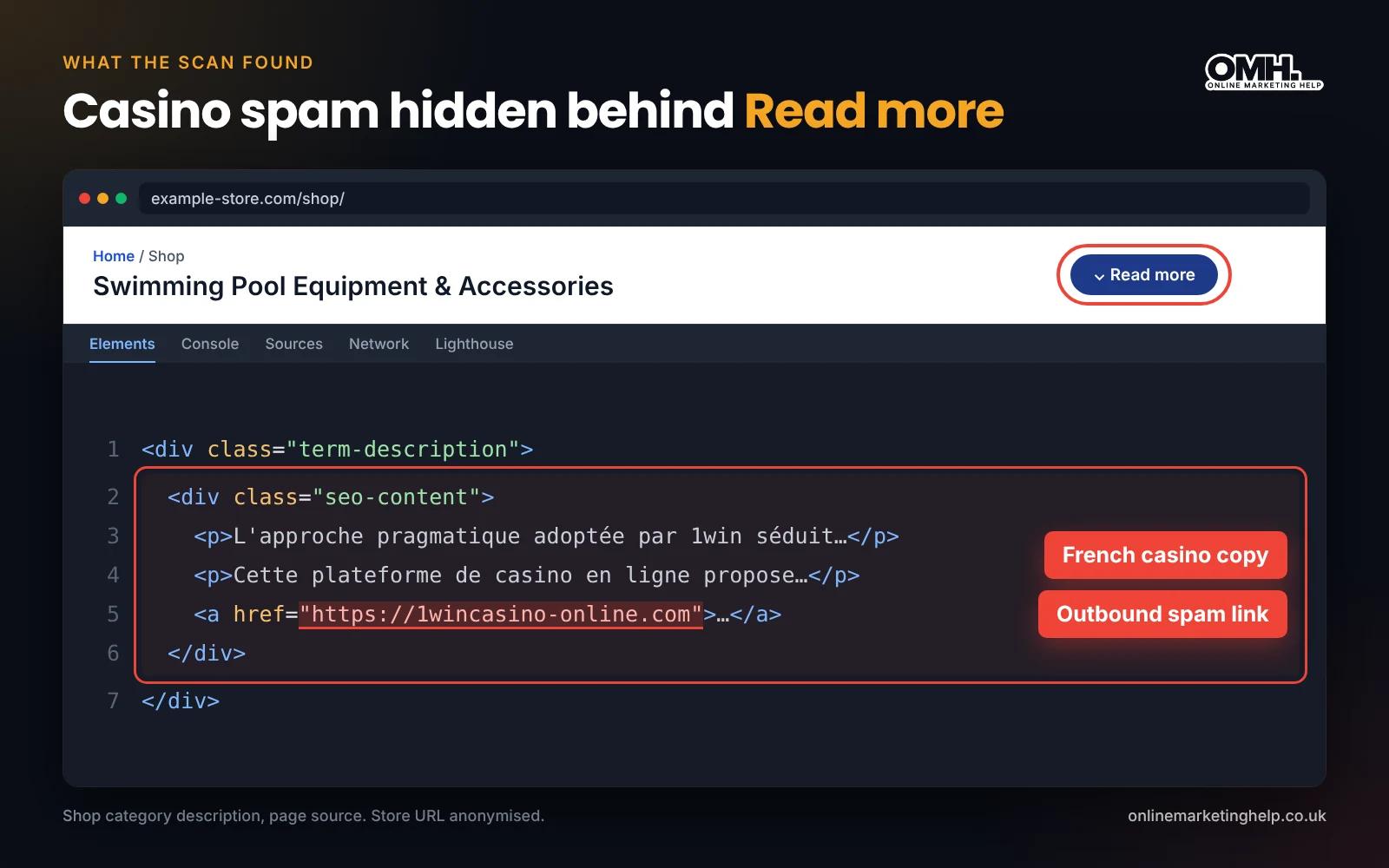
- about 1,200 words of French-language gambling content promoting the casino brand "1win"
- the spam sat between the product sorting controls and the product grid
- links pointing to an external online casino
- a "[Read More]" link at the end that led nowhere, meant to keep the block folded away
- proof that Google had already indexed the page, with the spam showing in search results
The verdict was clear. The content had nothing to do with the products on sale, and someone had hacked the site.
One infected page turned out to be many#
Our SEO team checked the finding by hand. We verify every AI finding against the live page, the page source or the database before acting on it. They went through:
- the homepage
- product and category pages
- the blog, about, contact and help pages
- every paginated shop page
Only the main /shop/ page showed the spam. It looked like a contained problem.
Our WordPress development team then took over to remove it. That's when the real scale of the hack showed up.
SEO spam removal: how we found and removed the casino text#
Our developers checked three places, in order:
- The page editor: clean. We opened the Shop page in the WordPress code editor and searched for "1win", "pragmatique" and "1wincasino". Nothing came up.
- Widgets: clean. We checked every custom HTML and text widget in the shop sidebars and shop areas. Nothing there either.
- The database: found it. We opened phpMyAdmin and ran SQL searches on the posts table and the post meta table. Elementor stores page layouts in post meta, so the spam could hide there even when the editor looked clean.
These are the searches we ran:
SELECT ID, post_title, post_content FROM wp_posts
WHERE post_content LIKE '%1win%'
OR post_content LIKE '%1wincasino%';

SELECT post_id, meta_key FROM wp_postmeta
WHERE meta_value LIKE '%1win%'
OR meta_value LIKE '%1wincasino%';
The results showed exactly which tables and rows held the casino text. It was not only on the Shop page. The same spam text appeared on more than 20 pages across the site.
We then used SQL commands to remove the casino text from every affected table. The spam never showed in the page editor, so the database was the only place we could clean it.
The takeaway: what you see on the page is not always what sits in the database. If you find spam on one page, assume there's more until a database search proves otherwise.
After the clean-up: close the way in#
Removing the spam fixes what you can see. To stop it coming back, work through these checks after any SEO spam removal:
- Audit user accounts. Remove any admin or editor accounts nobody recognises.
- Reset passwords. Give every admin and editor account a new, strong password.
- Update everything. Move WordPress core, WooCommerce, your theme, your page builder and every plugin to the latest versions.
- Scan for backdoors. Run a malware scan, then check for PHP files in the uploads folder, unfamiliar plugin folders and odd redirect rules in .htaccess.
- Check other hiding places. Search the options table (wp_options) for the spam words too, and look for scheduled tasks (cron jobs) you don't recognise.
- Clear your caches. Clear the page builder cache and any caching plugin, so visitors and Google see the clean version.
Most hacks start with something small, like an outdated plugin, a weak password or a missed update. Regular WordPress maintenance with backups, updates and security checks helps close those gaps before anyone can use them.
The SEO impact of a hacked website#
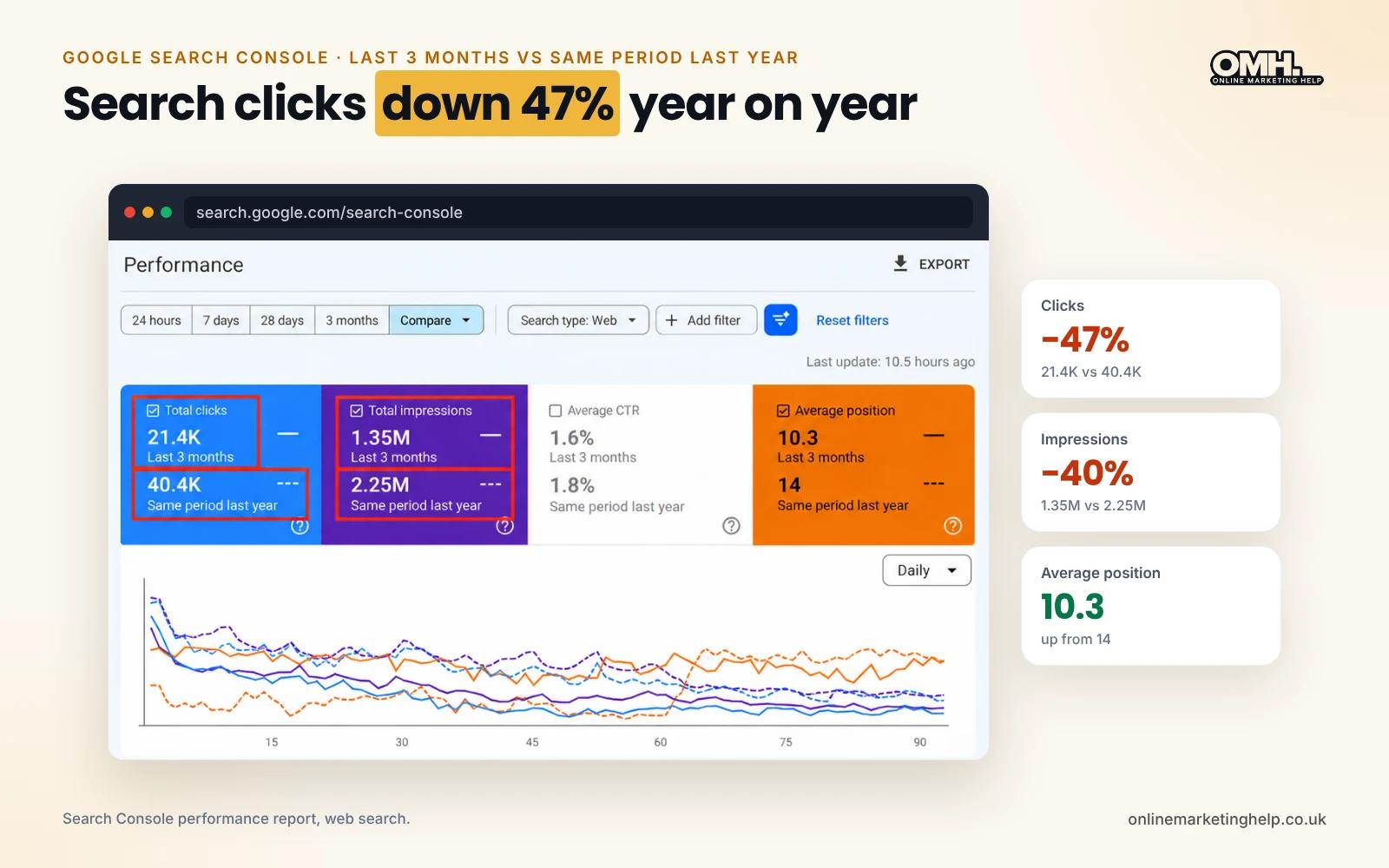
The spam was live during the months that matter most to a seasonal business. Here's what we saw in the data, and how a hack like this can cause each change.
| What we saw | How a hack can cause it |
|---|---|
| Rankings dropped across many pages | Google treats hacked content as spam. Its spam policies say sites that break them "may rank lower in results or not appear in results at all". |
| Impressions fell | Lower rankings mean the site shows up in fewer searches. Off-topic gambling text also blurs what a page is about, so it can match fewer product searches. |
| Clicks fell | Fewer impressions bring fewer clicks. Google had also indexed the shop page with the spam showing in search results, and casino text under a shop listing can put buyers off. |
| Sales fell below last year | For a seasonal product, the weeks lost in peak season can't be won back later in the year. |
Trust is at risk too. Links to a gambling site tie a store to a bad neighbourhood. Google can also show a warning label next to hacked pages in search results.
A note on cause and effect. The spam wasn't the only thing that could move these numbers. Search demand, competitors and the season itself all play a part, so we can't pin the whole sales drop on the hack. But spam on a shop page is a risk no store should carry into its busiest months.
Timing matters. A few weeks of spam in a quiet month might cost little. The same few weeks in peak season can cost a large share of the year's online sales, because buyers who can't find you buy elsewhere.
What recovery looks like#
Cleaning the site is the first step. Rankings only recover once Google has recrawled the cleaned pages and reassessed the site. That takes time, and recovery is possible but not guaranteed.
Our recovery plan has four parts:
- Security review. If Search Console lists a security issue or a manual action, fix every example it shows, then select Request Review. Google says reviews can take a few days to a few weeks.
- Recrawl requests. Use URL Inspection to request indexing for the most important pages first, starting with shop and category pages.
- Weekly tracking. Compare rankings, impressions and clicks each week against the period before the hack.
- Repeat database searches. Run the same SQL searches for several weeks, in case a hidden backdoor puts the spam back.
While organic rankings recover, Google Ads can keep your products in front of buyers during peak season.
5 lessons for ecommerce owners#
- A clean technical audit doesn't mean a clean site. Crawlers check structure. Something, or someone, also needs to read the content.
- A clean page editor doesn't mean a clean page. Search the database, not only what you can see in WordPress.
- Check before your busy season. Run a security and content check a month or two before peak demand.
- Watch Search Console for searches you never targeted. If a kitchenware shop starts getting impressions for "casino" or "bet", something is wrong.
- Keep your site locked down. Outdated plugins, weak passwords and fake plugins are the usual ways in. Security firm Sucuri has documented casino spam links injected by a fake WordPress plugin with a harmless-sounding name.
A hack isn't the only cause of a sudden drop in rankings. A badly handled rebuild can do the same, which is why we wrote a guide to redesigning your website without hurting your SEO.
How to set up Claude AI SEO Audit skills#
You don't need to build a Claude Site Audit SEO skill from scratch. We're sharing ours, so you can use it as it is or adapt it to your own checklist. Here's how to get started:
- Write down your checklist. List every check you run on an audit, from crawl and indexing issues to content that does not belong. Note what a problem looks like for each one.
- Download our Claude Site Audit SEO skill. Get the zip file here: [DOWNLOAD LINK]. It already includes the Site Audit SKILL.md file with a name and a description, which Claude uses to decide when to load the skill.
- Add your instructions and report format. Explain each check step by step. Set the severity labels and the "How to Fix" format you want in every report.
- Install it. In the Claude app, upload the skill folder as a zip file. In Claude Code, save it in ~/.claude/skills/ for yourself or in .claude/skills/ inside a project.
- Test it on a site you know well. Check every finding by hand before you trust it on client work.
The prompt to run your audit
Once the skill is installed, start a new chat and paste this prompt. Swap example.com for your own domain.
How many pages Claude can reach depends on the tools it has, such as web search and page fetching in the Claude app, or a crawler in Claude Code. Claude can't see backlink data on its own, so attach an export from Ahrefs or Semrush for the off-page checks.
Want to change the skill? Anthropic's skills documentation explains the file format. Prefer us to run it for you? We run AI SEO audits for clients with this Claude SEO skill, alongside Semrush and Screaming Frog.
How to check if your WordPress site is infected with SEO spam#
You can run these checks in under an hour. If any of them turns something up, treat the site as hacked until you know otherwise.
- Search Google for your own site. Type site:yourdomain.co.uk casino into Google. Repeat with words like 1win, bet and slots. Any result on your domain is a red flag.
- Check your Search Console queries. In the performance report, filter queries for casino, bet or slot. Impressions for words you never targeted point to injected content.
- Look for Google Search Console security issues. Open both the Security Issues and Manual Actions reports under Security & Manual Actions. Google lists hacked content and any manual actions here if it has spotted them.
- Search the database. Back up first. Then run the SQL searches shown above, swapping in words like casino, slots or any brand name you've spotted. Your table prefix may not be wp_.
- Look for strangers. Check Users for admin or editor accounts you don't recognise. Then check the uploads folder for PHP files. There shouldn't be any.
Frequently asked questions#
What is a Claude SEO site audit?
A Claude SEO audit uses Claude, Anthropic's AI assistant, to review a website against a set of SEO checks. With a custom skill, Claude works from the same audit checklist each time. It also reads page content, so it can spot problems that crawlers treat as normal text, such as injected spam. AI can get things wrong, so check every finding against the page source or the database before you act.
Is a Claude SEO skill the same as a Claude SEO tool?
Not quite. People call all sorts of things Claude SEO tools, including third-party apps built on Claude. A Claude SEO skill is narrower: a set of instructions you add to Claude itself, so it follows your own process inside the Claude app or Claude Code.
Why didn't Semrush or Screaming Frog detect the casino spam?
Both tools check technical health, such as status codes, links, metadata, duplicate content and page speed. They don't judge whether the text on a page fits the business. So a block of foreign-language gambling copy with one outbound link looks like normal content to a crawler.
Can SEO spam hurt my Google rankings?
Yes. Google treats content added through a hack as spam. Its policies say sites that break them "may rank lower in results or not appear in results at all". Hacked pages can also carry a warning label in search results, which puts people off and cuts clicks.
How does WordPress SEO spam get onto a site?
WordPress SEO spam usually gets in through outdated plugins or themes, weak or reused passwords, or fake plugins. Once inside, hackers add spam to page content, page builder data, widgets or the footer. Many also leave a backdoor file so they can get back in after a clean-up.
How do I remove SEO spam from my website?
Back up the site first. Search the page editor, the widgets and the database for the spam words, then remove the text wherever it appears. On many sites, the database is the only place it shows up. Then remove unknown users, reset passwords, update everything and ask Google to recrawl the cleaned pages.
How long does it take to recover rankings after a hack?
Recovery is possible, but not guaranteed. It depends on how long the spam was live, whether the site is fully secured and how quickly Google recrawls it. If Search Console flagged a security issue, Google says its review can take a few days to a few weeks. The sooner you clean up, the sooner Google can reassess the cleaned pages.
Worried your site has been hacked?#
If your rankings have dropped and your usual tools can't explain why, the cause may be hiding in your content or your database.
Online Marketing Help is an Essex-based digital marketing agency. We pair AI SEO audits with hands-on SEO and WordPress development. We find the problem and fix it at the source, then track your recovery in Search Console.
Keep reading
Related insights
SEO
Zero-click searches, AI Overviews and featured snippets: How to win position zero
Discover how to win Position Zero on Google by mastering zero-click searches, AI Overviews, and featured snippets. Boost visibility and drive traffic with smart SEO strategies.
Read articleSEO
10 Best SEO-Optimised WordPress Themes for Higher Rankings
Boost your site’s rankings with the best SEO-optimised WordPress themes. Choose the right theme for better visibility and higher rankings.
Read articleSEO
The Importance of Page Speed, Image Compression, and Resizing
Is your website slow? Find out how optimising page speed through image compression and resizing can enhance user satisfaction and elevate your SEO performance. Read more!
Read articleTurn useful ideas into a practical growth plan.
Tell us what you want to improve and what you have tried so far. We will help you identify the clearest next step.
What happens next
- Review the current position
- Define the commercial objective
- Agree the work and measurement